

With the festive season well under way, we are happy to announce the availability of our tenth Sailfish OS software update Vaarainjärvi! This update includes significant enhancements to the existing Jolla user experience and adds new features. At the same time we’re also releasing the features from the previous update, which was made available on a request only.
Since Update8, we have introduced major technological changes in our software, with an update of our UI framework from Qt5.1 to Qt5.2. We have also worked hard on the performance of Sailfish OS and achieved major improvements by optimizing the memory usage in many areas.
We’re also happy to bring you several new functionalities, including the possibility to silence/ignore phone calls or snooze the alarm by flipping the phone over, copy/paste between Sailfish OS and Android apps, new map views (satellite, car, transit and night), and a search function for your music library. We’ve also made navigation inside apps more simple to work with, and continued to improve the first-time user experience.
Faster and smoother user experience
On the memory handling side of things, this update introduces dozens of memory optimizations across the OS to enhance the multitasking experience and lets you run more apps at the same time. Android apps are also now more responsive than ever before due to technical improvements, with the Wayland system integration and GPU memory usage of minimized apps.
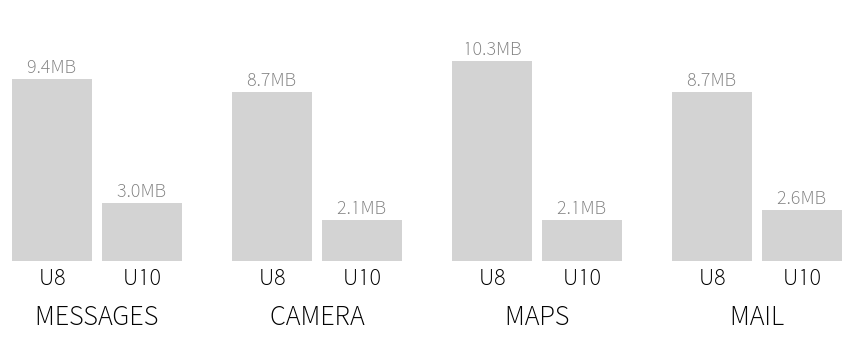
GPU memory of minimized apps
We’ve also managed to speed up many common use cases, through targeted performance optimizations, with the browser, contacts and call log handling, to name but a few. The graphics memory usage of minimized apps has been significantly improved (see image), and work was done on app startup times, scrolling speeds of the home screen, browser pages and tiled maps. All these should make the overall user experience faster, more smooth and more enjoyable than ever before.
Simpler navigation inside Sailfish OS apps
One of the user experience improvements we have made, is the simpler navigation within Sailfish OS’s own apps. Whether you are using messaging, email, system settings, it should now be clearer how to navigate your way around the app.
This has been achieved by removing some of the complexity. In the previous page stack model, the current page was shown as a highlighted dot and the previous and next pages as a slightly ‘dimmed’ dot. For example, if you were on the third level of a page hierarchy, you were shown two ‘dimmed’ dots and one highlighted on the left of the screen. However, in some apps the hierarchy can be so deep, that we cannot show the full path as dots, this creates inconsistency, as we have to show less dots than there are actual pages.
So, what did we change? Instead of showing the current page level in the page stack, we simplified the model by only showing one indicator, either side of the screen, to simplify the visuals and the logic. When there is a page to the left, we show an indicator on the left. Same applies to the following page, i.e. when there is a possibility to go right, we’ll show an indicator on the right-hand side of the screen. Thus, the indicator only communicates whether you can do the flick gesture or not, it no longer reflects the size of the hierarchy.
Big update with a lot bug fixes
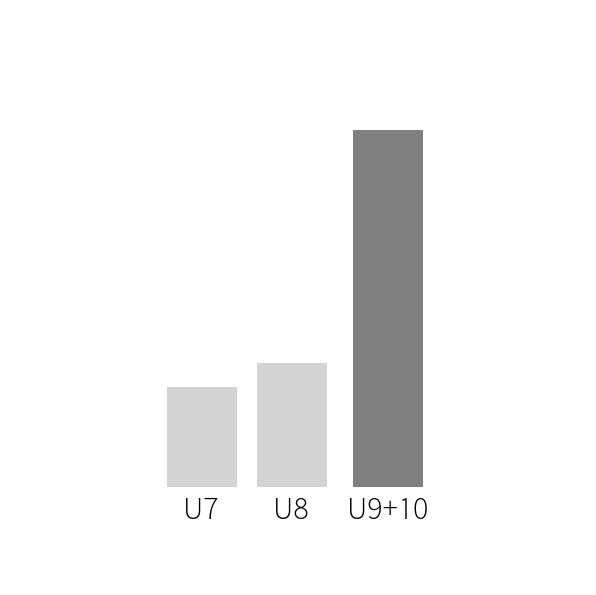
Amount of bug fixes in Sailfish OS updates
In this and the previous update we’ve worked rigorously on fixing different problems, and making a lot of areas better in Sailfish OS. Compared to the previous software updates we’ve now managed to solve clearly over double the amount of bugs.
What this means in practice is that we’re now very confident with this software update, and we hope that you enjoy Sailfish OS and the Jolla phone even more than before!
Check out the full listing of the release contents here.
Update now!
Please ensure that you have ~2GB of free disk space before updating your Jolla. If connected to the internet, your Jolla should have received an OS update notification, which you can access through the events view (swipe over from the bottom). Remember to take a back-up of your phone content before updating and copy it to a memory card.
Further instructions are here.
Happy Holidays!